Describe the bug
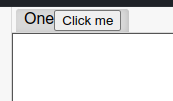
I'm trying to add an additional clickable icon in the tab name (similar to the close icon, but for a different action).
I tried by just passing a <button onClick={eventHandler}>Click me</button> as tab name directly or via renderValues.content / renderValues.leading / renderValues.buttons in the onRenderTab callback. The button is displayed, but the click handler is not called, when inspecting there's a 'noop' click handler instead.
Your Example Website or App
https://jsfiddle.net/sebakerckhof/d6guxL0q/7/
Steps to Reproduce the Bug or Issue
Add a clickable target in the tab name and try clicking on it.
Expected behavior
Click handler is called
Operating System
Ubuntu 22.04
Browser Type?
Chrome
Browser Version
111.0.5563.64
Screenshots or Videos
Additional context
No response
Describe the bug
I'm trying to add an additional clickable icon in the tab name (similar to the close icon, but for a different action).
I tried by just passing a
<button onClick={eventHandler}>Click me</button>as tab name directly or viarenderValues.content/renderValues.leading/renderValues.buttonsin theonRenderTabcallback. The button is displayed, but the click handler is not called, when inspecting there's a 'noop' click handler instead.Your Example Website or App
https://jsfiddle.net/sebakerckhof/d6guxL0q/7/
Steps to Reproduce the Bug or Issue
Add a clickable target in the tab name and try clicking on it.
Expected behavior
Click handler is called
Operating System
Ubuntu 22.04
Browser Type?
Chrome
Browser Version
111.0.5563.64
Screenshots or Videos
Additional context
No response