15

I want to extract the .net 4.7 framework prerequisites with my main msı.

But when ı try to install .net installation give an error.

After ı try to install .net framework only.

.net framework installation gives an error

.net framework 4.7 a certificate chain processed but terminated in a root.

How to certificate it with Wix?

  <ExePackage
         InstallCommand="/q /norestart /ChainingPackage &quot;[WixBundleName]&quot; /log &quot;[NetFx47FullLog].html&quot;"
          RepairCommand="/q /norestart /repair /ChainingPackage &quot;[WixBundleName]&quot; /log &quot;[NetFx47FullLog].html&quot;"
          UninstallCommand="/uninstall /q /norestart /ChainingPackage &quot;[WixBundleName]&quot; /log &quot;[NetFx47FullLog].html&quot;"
          PerMachine="yes"
          DetectCondition="!(wix.NetFx47WebDetectCondition)"

          InstallCondition="NetFrameWorkCheckbox = 1"
          Id="NetFx47Web"
          Vital="yes"
          Permanent="yes"
          Protocol="netfx4"
          DownloadUrl="$(var.NetFx47WebLink)"
          LogPathVariable="NetFx47FullLog"
          Compressed="yes"
     Name="!(wix.NetFx47WebPackageDirectory)NDP47-KB3186500-Web.exe"
    SourceFile=".\prerequisites\NNDP47-KB3186497-x86-x64-AllOS-ENU.exe"


         >

3 Answers 3

24

I also met the same issue when installing .NET framework 4.7 on the PC with Win 7 sp1 system.

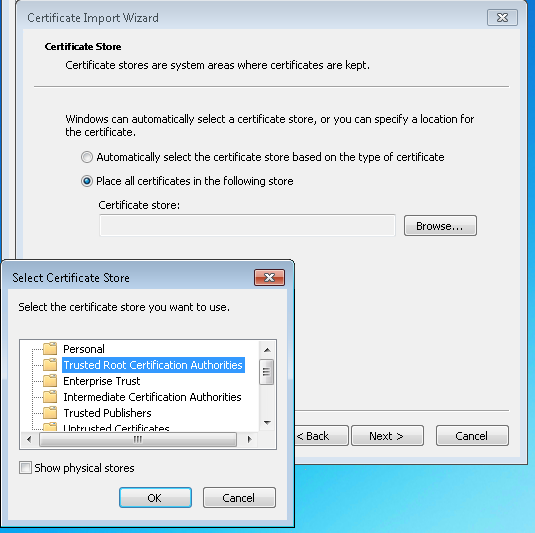
The solution with detailed steps is below can be seen in:

https://stackoverflow.com/a/60812129/6075331

Step2

Then the issue will hopefully be resolved.

Sign up to request clarification or add additional context in comments.

Comments

2

A solution that worked for .NET Framework 4.8 (and hopefully 4.7 as well):

Your PC may be missing a certificate: For my problem, I needed to import MicRooCerAut2011.crt to console root (windows + R, type "mmc", then press Enter).

Here are step-by-step instructions on how to do this (the text is in Indonesian, but the images should make sense anyway) and where to download the certificate file from.

1 Comment

A link to a non-English website is not very useful. It's preferable to simply add all the necessary details to the answer, and avoid the link entirely.
0

Update: Recently down-voted. Please let others know what didn't work. I have not looked at this issue for a long time.


Heath Stewart's Blog: I think you will find the explanation here: A certificate chain could not be built to a trusted root authority. Essentially some components in Visual Studio 2012 were signed with a SHA256 hash certificate not installed on all Windows versions.

Are you on a virtual? It might not be updated - running Windows Update might fix the whole problem? You need a root certificate update. I would try that before reading the information below. I would assume the problem would be fixed by now via Windows Update, but perhaps not?


You will find links in the above, linked blog. I will just inline a few of the links here (in case the blog disappears):

And a general link just for reference: .NET Framework deployment guide for developers.

2 Comments

Thank you but ı already ı added microsoft root certifacete and d3d compiler.dll.Now it works good.
Not sure I understand, you got it working some other way?

Start asking to get answers

Find the answer to your question by asking.

Ask question

Explore related questions

See similar questions with these tags.